1. Plan one visible scene
Pick one or two characters and write one action per panel. Set the panel count, reading order, and ending. Choose text input, a photo, or a saved reference in the creator above.
Turn your idea into panels you can refine.
Create comic art from a text prompt or a photo reference. Plan a short scene, choose a visual style, and refine the result with OiiOii. Start with a single panel or a four-panel draft, then build your story scene by scene.
Generation uses Credits. Review artwork and lettering before sharing.
Generation uses Credits. Check the cost for your chosen model and settings.
Turn a short scene into panels. Define the action, cast, and art style.
Restyle a familiar face or setting. Start with a clear, well-lit image.
Reuse a saved reference for later scenes. Check the outfit and facial features.
Pick one or two characters and write one action per panel. Set the panel count, reading order, and ending. Choose text input, a photo, or a saved reference in the creator above.
Choose an image model and describe the layout, style, and character details. Review the Credits cost for your settings before generating. Start small so the result is easy to inspect.
Check actions, faces, hands, props, and panel order. Revise the weakest beat or generate it separately. Assemble the layout and add or proofread dialogue in an editor before sharing.
Use an AI comic generator from photo references to restyle a familiar portrait. Compare the smile, hair, outfit, and turquoise vehicle before changing the pose or scene.

The source photograph keeps the smile, windblown hair, white outfit, and turquoise vehicle together in one clear reference.
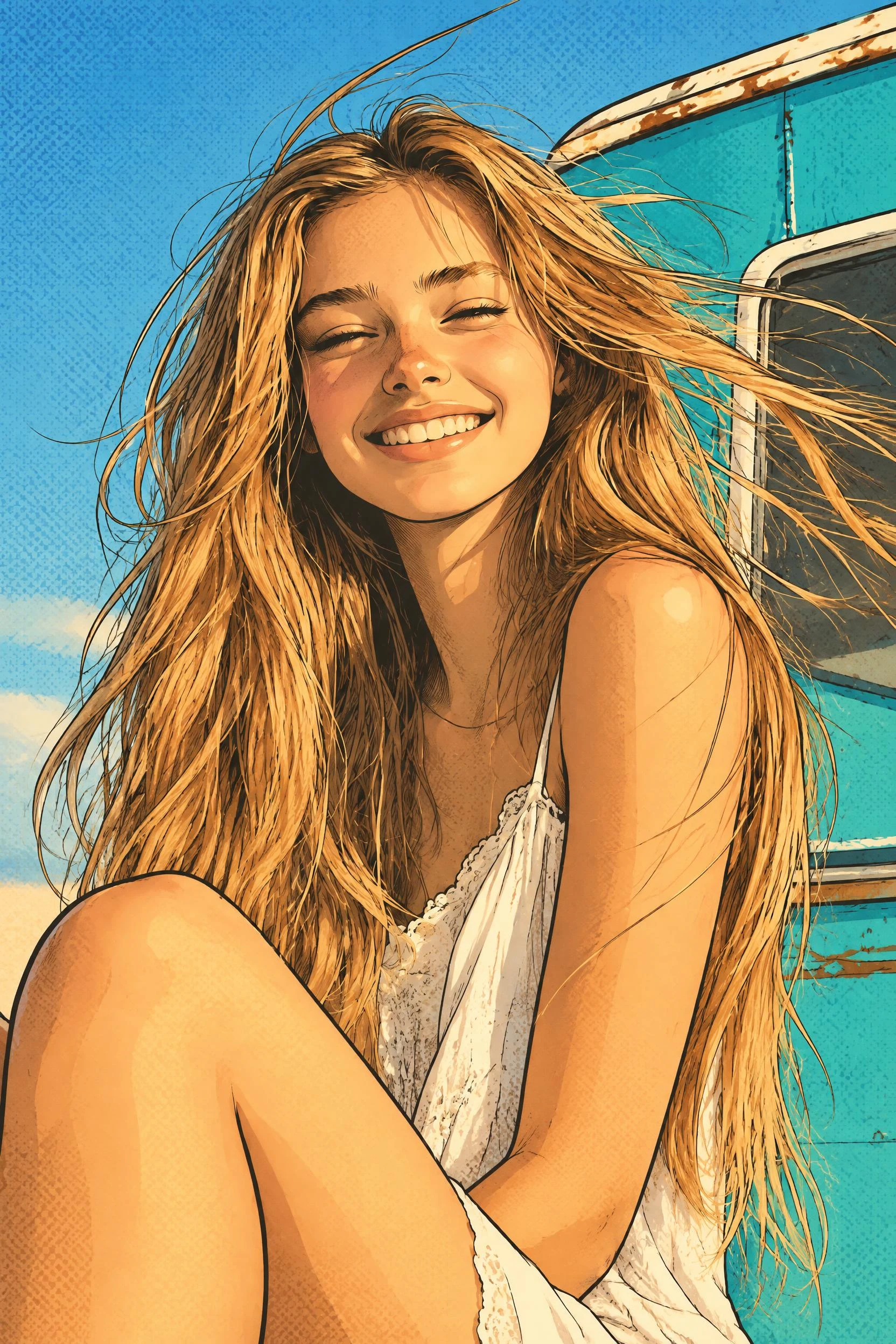
The same portrait, reinterpreted with ink contours, warm colors, and halftone shading. Generated with Oii Image 2.5 Pro. Compare the face, pose, and background with the original.
A reference guides likeness; it does not guarantee an exact match.
One panel: use an AI comic image generator for a character introduction, a reaction, or one visual joke. Choose a single decisive moment.
Four panels: show a setup, action, reaction, and payoff. Specify the grid and left-to-right reading order. A whole-page draft helps you explore the sequence quickly; individual panels give you more control over revisions.
A longer story: treat an AI comic book generator as one part of the process. Outline scenes, develop character references, and work page by page. An AI comic book maker workflow still needs layout, lettering, continuity checks, and final file preparation.
A practical comic creator AI workflow starts with a small, readable sequence. The three examples below adapt short moments from classic books using original character designs. Each demonstrates a different storytelling decision. They are working drafts with visible limitations, not finished book pages.
Original AI-generated adaptations of short moments from classic books. These working drafts show both useful storytelling choices and details to review.
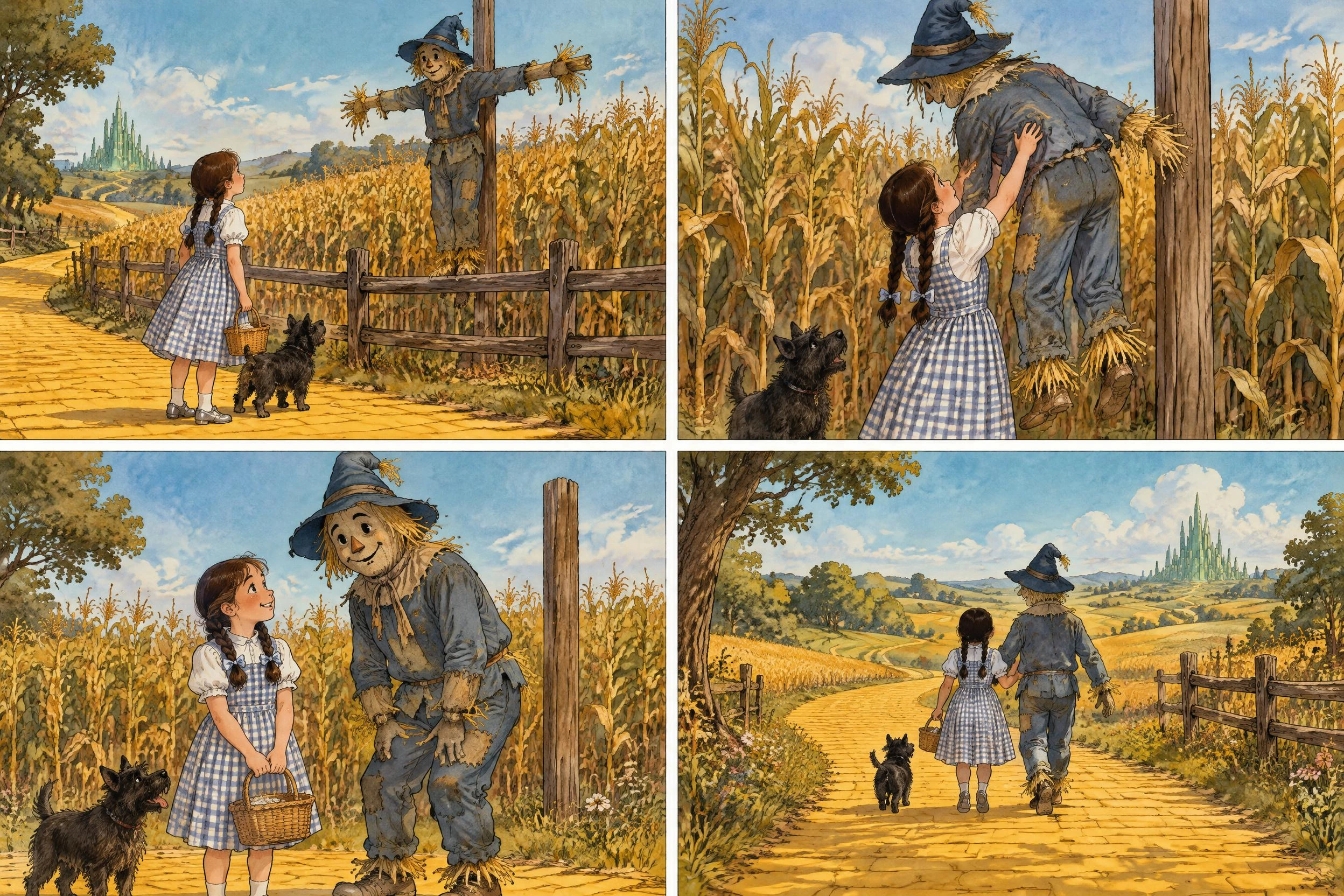
Dorothy discovers the Scarecrow, helps him off the pole, shares a grateful look, and walks onward with him. A wide opening establishes the problem; a closer view shows the help; the final wide view reveals the new companions.
Try the same sequence with a stranded astronaut and a repair robot. Review Dorothy's hands and the Scarecrow's attachment to the pole: contact details can drift even when the overall story reads clearly.
Generated with Oii Image 2.5 Pro, 3:2, 2K.
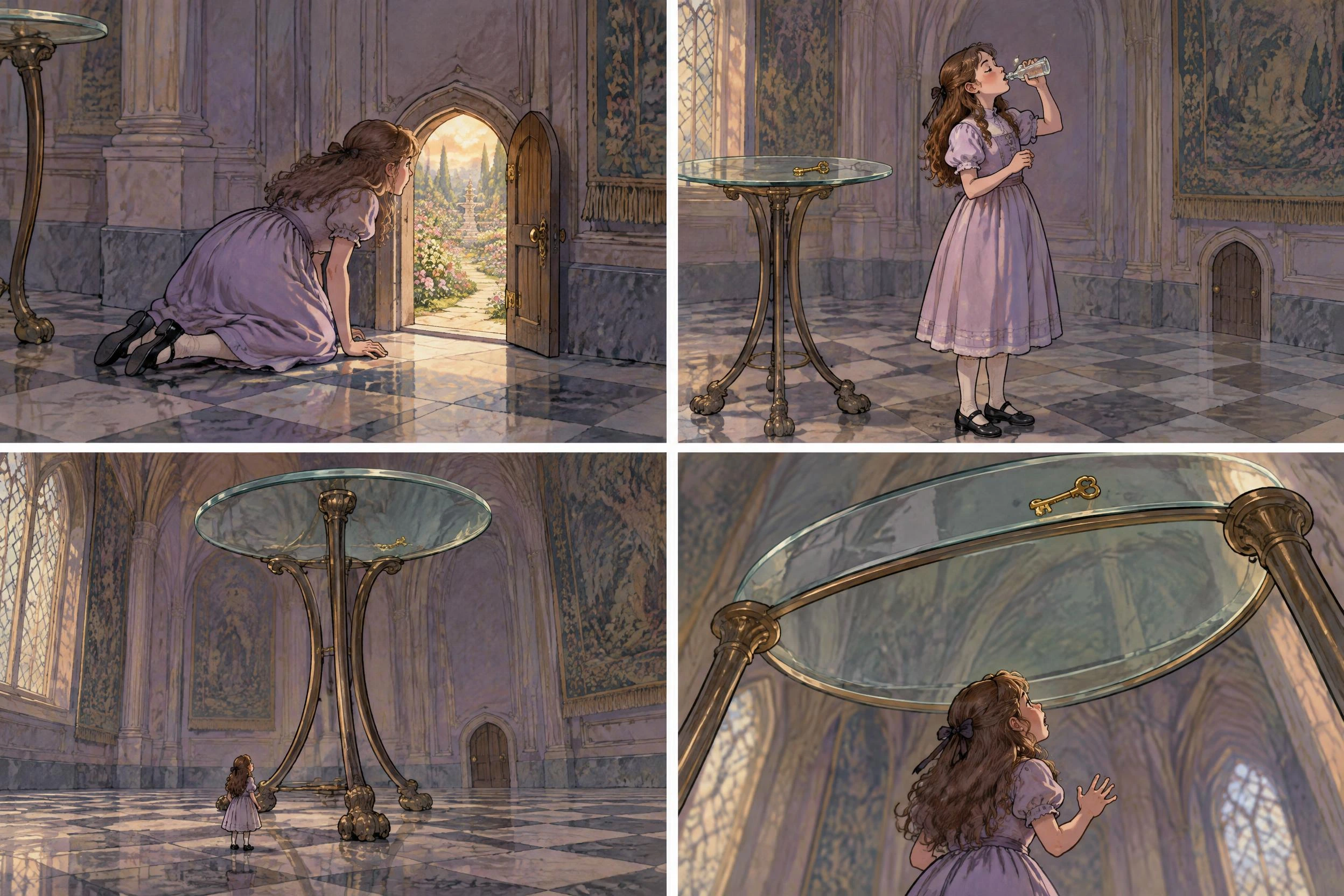
Alice finds a doorway she cannot fit through, drinks from a bottle, shrinks beneath the table, then discovers that the key is out of reach. The unchanged table and key give the reader a scale reference.
For your own transformation scene, name an object that stays the same size. Review the background between panels: in this draft the door changes from open to closed, which needs explanation or revision.
Generated with Oii Image 2.5 Pro, 3:2, 2K.
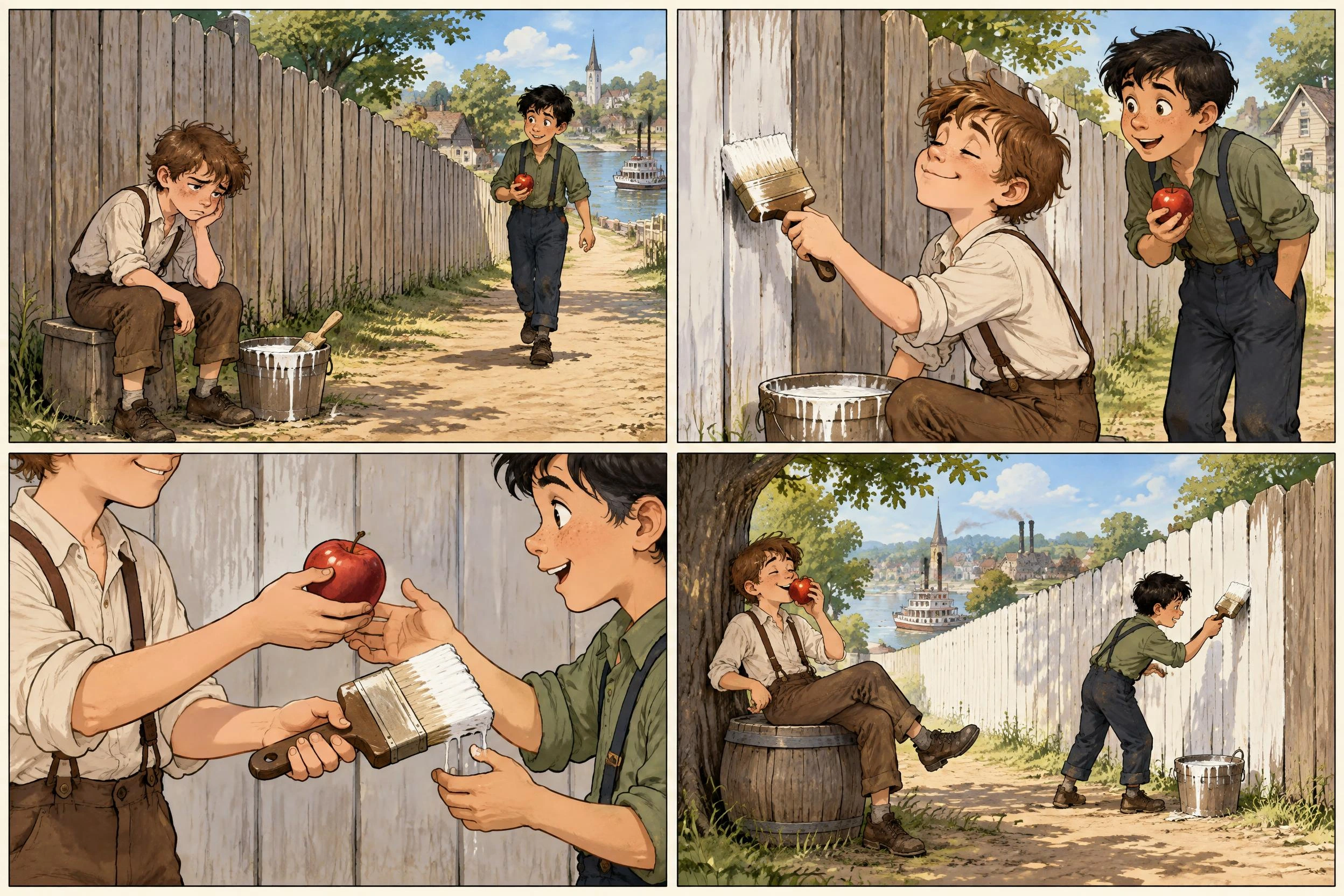
Tom dislikes whitewashing the fence, makes the work look desirable, trades a turn for Ben's apple, then relaxes while Ben paints. The last panel reverses the first; the apple and brush prove what changed.
For your own visual joke, show an unwanted task, a tempting performance, a trade, and who benefits. Inspect the handoff: this draft makes the reversal clearer than the exact exchange. Two separate before-and-after views can simplify the action.
Generated with Oii Image 2.5 Pro, 3:2, 2K.
Show who is there, where they are, and what they want.
Use one visible action per panel. Split complicated actions into separate beats.
Follow the key prop: who holds it, and what changed?
Finish on a result, reaction, or new obstacle. Change the camera distance.
Read the sequence without dialogue. If the action is unclear, fix the artwork before adding words.
Create a short character note before your first generation: hair, face shape, outfit colors, footwear, and one key accessory. Repeat those details in later prompts and reuse a suitable reference image where supported.
For the Oz example, Dorothy's braids, checked dress, basket, and silver shoes form the reference checklist. Avoid adding several new costume details halfway through a scene.
Keep a scene note too: where the door is, which hand holds the object, and which direction the characters are traveling. In the Tom Sawyer example, tracking who holds the apple and brush matters as much as matching faces.
After each result, compare the first and last panels. If the identity drifts, simplify the new action and reinforce the distinctive features. References help guide continuity; they do not guarantee an exact match.
These examples were generated without lettering so the visual story can be judged on its own. For dialogue-heavy scenes, leave open space above or beside the speaker rather than covering a face or an important action.
Write the conversation separately. Give each bubble one short thought, place the first speaker toward the left when possible, and keep the intended reading order clear. Add final lettering in an editor when exact words and placement matter.
If you ask the image model to render dialogue, put the exact wording in the prompt and proofread every letter. Check the bubble tail points to the right speaker. A convincing-looking bubble can still contain incorrect words.
Before sharing, view the page at phone size. If the dialogue is hard to read, shorten it or divide the scene; enlarging a crowded bubble may hide the story.
Give your comic AI maker a specific correction. Write one sentence describing what changes in each panel. If two sentences describe the same moment, replace one with an action or consequence. Specify left-to-right reading order and one action per panel. Generate the hardest action as a single image if the sequence remains unclear.
Repeat a short, specific character description and reuse a suitable reference. Keep the outfit, hairstyle, palette, and accessory fixed while testing the new pose. Avoid changing several character details and the art style in the same revision.
Simplify contact. Show the object in one hand before the trade, then in the other character's hand afterward. A complicated simultaneous handoff can be harder to read than two clear states. The Tom Sawyer exchange is a useful place to apply this check.
Specify the exact count and grid, but inspect the result because layout instructions are not guarantees. For more control, generate panels individually with the same style and references, then assemble them in a layout editor.
Name an object whose size stays fixed and use it in both views. For Alice, the table and key are the anchors. State that only the character changes size, and compare the background geometry before accepting the result.
Start with an AI comic generator from text: choose a short scene and write one visible action for each panel. Describe the character, setting, grid, reading order, and art style. Generate the artwork, using a reference when helpful. Check the result, repair confusing panels, and add or proofread dialogue. Start with four panels before expanding into a longer story.
You can use a photo reference with a compatible image model to guide comic-style artwork. Explain which features, clothes, or background details should stay recognizable. A reference guides the result; it does not guarantee an exact likeness.
Build it in stages: outline the story, generate the artwork, check continuity, and assemble the pages. Plan time for layout, lettering, and proofreading. A generated image should not be treated as a finished, print-ready book.
Reference images and repeated descriptions can help, but consistency varies. Reuse distinctive clothing, colors, and facial features, and inspect each result before moving on.
Text rendering varies by model and prompt. Check every word, bubble placement, and reading order. For precise dialogue, generate clean artwork and add lettering in an editor.
You can explore OiiOii before generating. Image and video generation use Credits, with the cost shown for your selected model and settings. Check the current account offers and daily check-ins for available rewards.
A whole-page prompt is useful for quickly exploring a short sequence and overall look. Individual panels give you more control over framing and revisions. For a longer comic, develop the sequence first, then create or refine panels separately and assemble them with consistent margins and lettering.
Select one encounter or turning point, not the entire plot. Identify what a character wants, what changes, and what the reader should understand at the end. Convert explanation into visible actions. The three book-based examples above demonstrate an encounter, a transformation, and a comic reversal.
Write a small moment worth seeing. Explore the artwork, refine the details, and build from there.
Explore image creation and the wider creative workspace.